Figma plugin · Chrome extension · MCP
कोई भी web पेज, असली Figma layers के रूप में।
HTML to Frames live URLs, local HTML, Chrome tabs और AI से बने code को एडिटेबल, रिस्पॉन्सिव Figma frames में बदलता है — verified Auto Layout के साथ, ताकि आपका डिज़ाइन कभी न टूटे।
Free plan: हर महीने 10 imports। कोई account नहीं, कोई credit card नहीं।
जल्द ही Figma Community पर
- Auto Layout, verified
- Desktop · Tablet · Mobile
- Variables और styles
- Components और hover states
पांच रास्ते, एक साफ़ नतीजा।
- Linkकोई भी public URL paste करें।
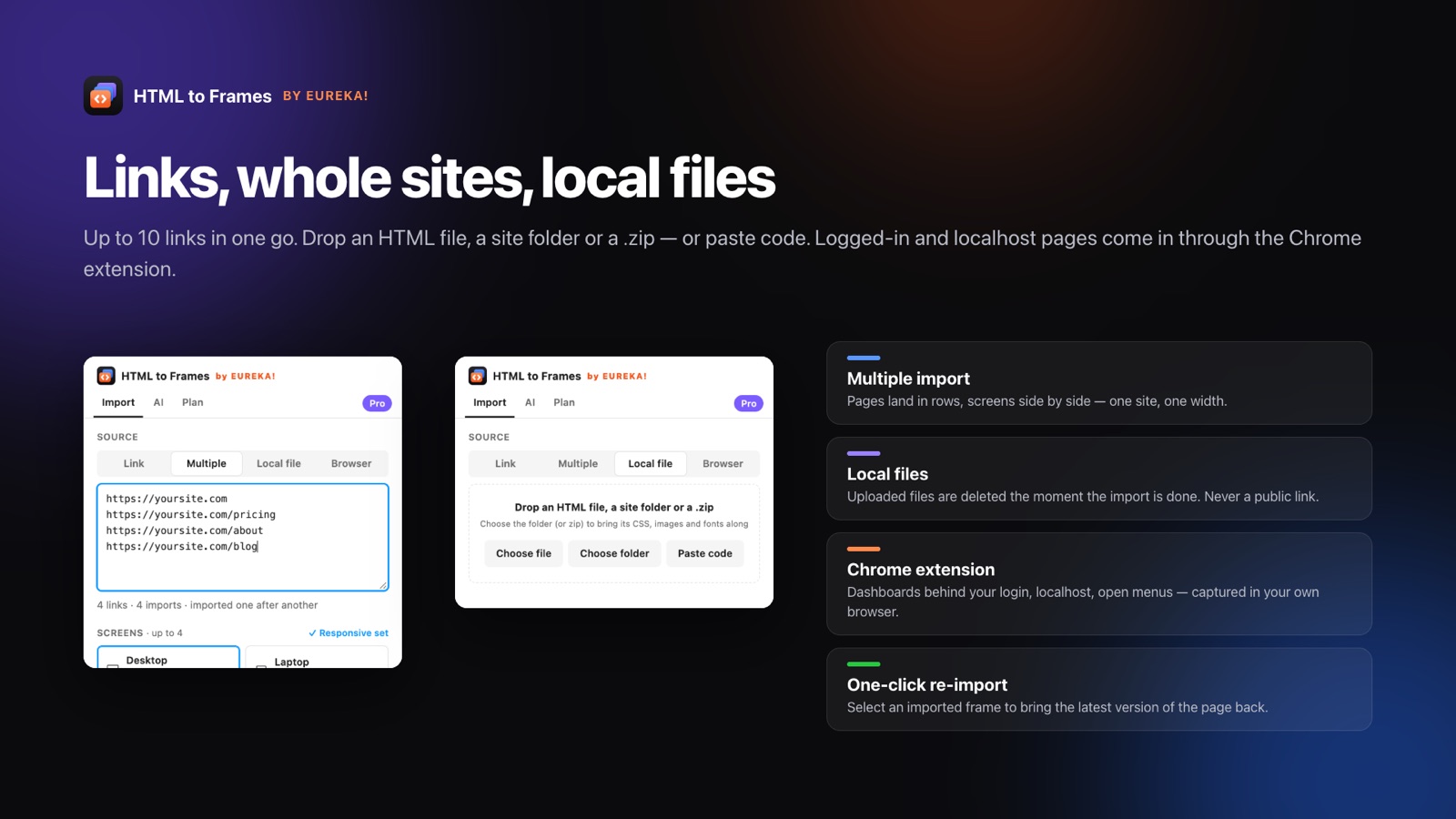
- Multipleएक बार में 10 links तक, हर plan पर।
- Local fileHTML file, site folder, .zip या paste किया गया code।
- BrowserLogged-in पेज, localhost, खुले menus।
- AI toolsClaude, Cursor और कोई भी MCP client।
यह कैसे काम करता है
URL से Auto Layout frames तक, चार steps में
यह असली plugin flow है — वही panel जो आप Figma के अंदर इस्तेमाल करेंगे।
yoursite.com — Desktop (1440)
Tablet (768)
Mobile (390)
3 frames import हुए
77 में से 60 frames पर Auto Layout · 23 color variables · 19 text styles · 10 components
- 01
Link paste करें
या folder drop करें, code paste करें, Chrome tab भेजें या अपने AI tool से पेज push करवाएं।
- 02
अपनी screens चुनें
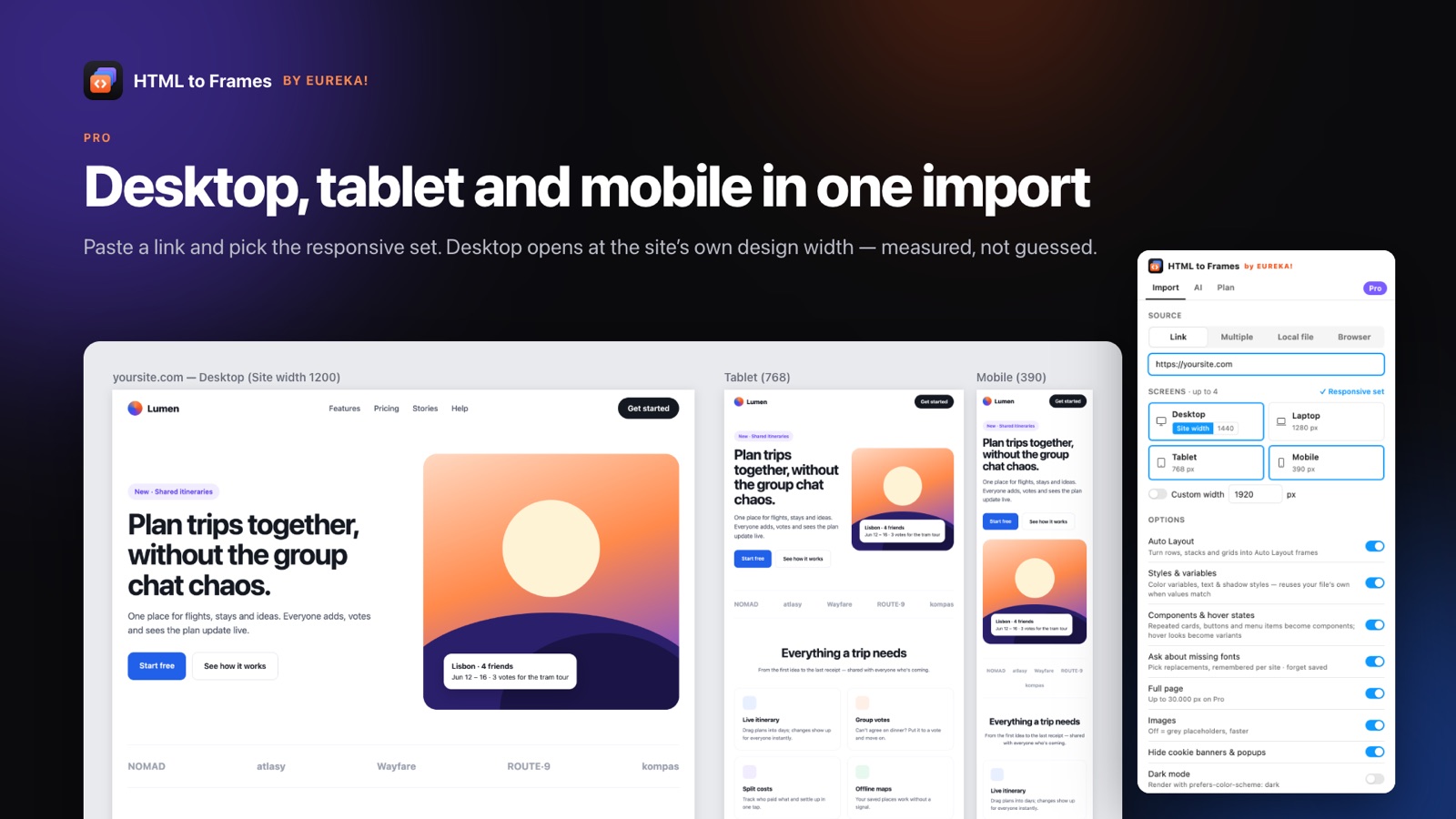
Desktop, site की अपनी design width पर खुलता है — अंदाज़े से नहीं, माप कर। एक click में Tablet और Mobile जोड़ें।
- 03
Import
एक isolated browser पेज को वैसे ही render करता है जैसे एक सामान्य visitor उसे देखता है, cookie banners छिपाता है और lazy content load करता है।
- 04
तुरंत edit करें
Frames, text, vectors और images, Auto Layout, variables, text styles और components के साथ आते हैं।
2 px
Auto Layout को browser के अपने layout से 2 px की tolerance के भीतर जांचा जाता है।
86–97%
हमने जिन असली sites को test किया, उनमें इतने प्रतिशत frames को Auto Layout मिला।
10
एक Multiple import में links — Free plan पर भी शामिल।
4
Pro पर हर import में screens: Desktop, Laptop, Tablet और Mobile।
असली sites पर हमारे अपने tests के आंकड़े — marketing का गणित नहीं।
Auto Layout engine
Auto Layout जो आपका डिज़ाइन कभी नहीं तोड़ता
ज़्यादातर converters layout का अंदाज़ा लगाकर उम्मीद करते हैं। HTML to Frames पहले पेज को pixel-exact बनाता है, फिर अंदर से बाहर की ओर काम करता है: browser की मापी गई geometry से stacks, wrapping rows, gaps, padding और alignment निकालता है, Auto Layout लागू करता है और हर child की position जांचता है। अगर कुछ भी 2 px से ज़्यादा खिसकता है, तो एक आसान plan आज़माया जाता है — और वह भी fail हो, तो frame समझदार constraints के साथ अपनी सटीक positions बनाए रखता है। Result screen यह भी बताती है कि कोई frame absolute क्यों रहा।
- Centered content, Center बनता है; बराबर cards, Fill बनते हैं
- Resize करने पर max-width containers centered रहते हैं
- Absolute frames को Stretch, Scale, Center या Min/Max constraints मिलते हैं
- एक diagnostics list हर उस frame की वजह बताती है जिसने absolute positions रखीं
Features
वह सब कुछ जो आपको वरना हाथ से दोबारा बनाना पड़ता
HTML to Frames पेज को वैसे पढ़ता है जैसे browser उसे layout करता है, फिर Figma layers वैसे लिखता है जैसे एक designer उन्हें बनाता।
Verified Auto Layout
Rows, stacks और grids, Auto Layout बन जाते हैं। लागू होने के बाद हर frame को जांचा जाता है — मेल न खाए तो उसे rollback कर दिया जाता है।
Responsive set
एक ही import में Desktop, Tablet और Mobile, parallel में capture होकर साथ-साथ रखे जाते हैं।
मापी गई site width
Desktop पेज की असली design width पर खुलता है — full-bleed layouts के लिए 1920, boxed sites के लिए box की width।
Variables और styles
Colors, site के CSS tokens के नाम वाले variables बन जाते हैं; typography और shadows styles बन जाते हैं। पहले से मौजूद variables और styles दोबारा इस्तेमाल होते हैं।
Components और hover
बार-बार आने वाले cards, buttons और menu items, instances वाले components बन जाते हैं; hover looks variants बन जाते हैं।
Light + Dark modes
एक import, दो modes: Light और Dark values वाला एक variable collection और हर screen की एक dark copy।
Prototype के लिए तैयार
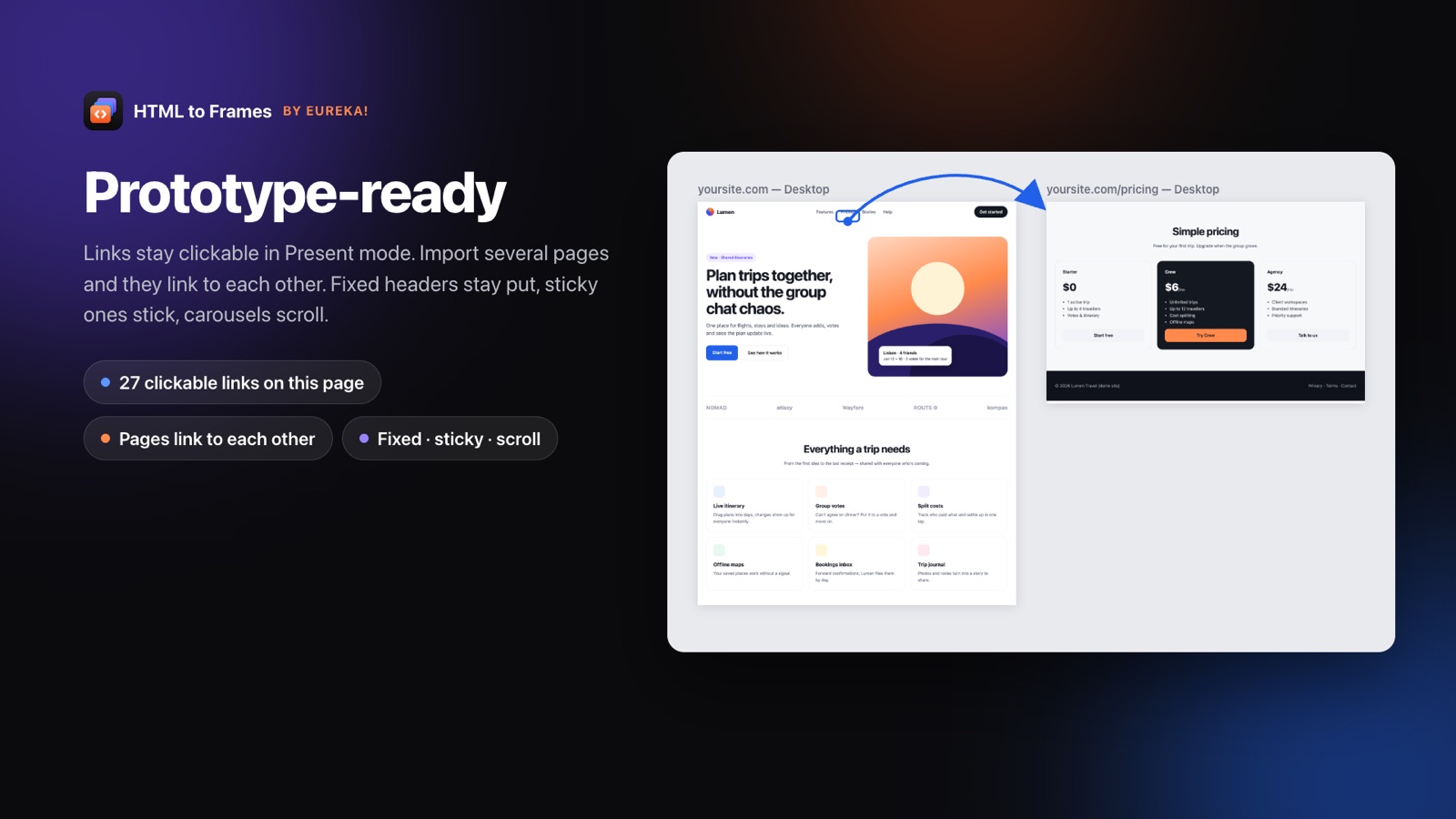
Links clickable रहते हैं, import किए गए पेज एक-दूसरे से link होते हैं, fixed headers और scroll areas Present में काम करते हैं।
Font mapping
Fonts missing हैं? एक बार replacements चुनें — हर site के लिए याद रखे जाते हैं।
Privacy डिज़ाइन में ही
नतीजे एक ही बार deliver होते हैं और कभी disk पर नहीं लिखे जाते। Upload की गई files import पूरा होते ही delete हो जाती हैं।
Design system को समझने वाला
Imports जो आपके design system में फिट हो जाते हैं
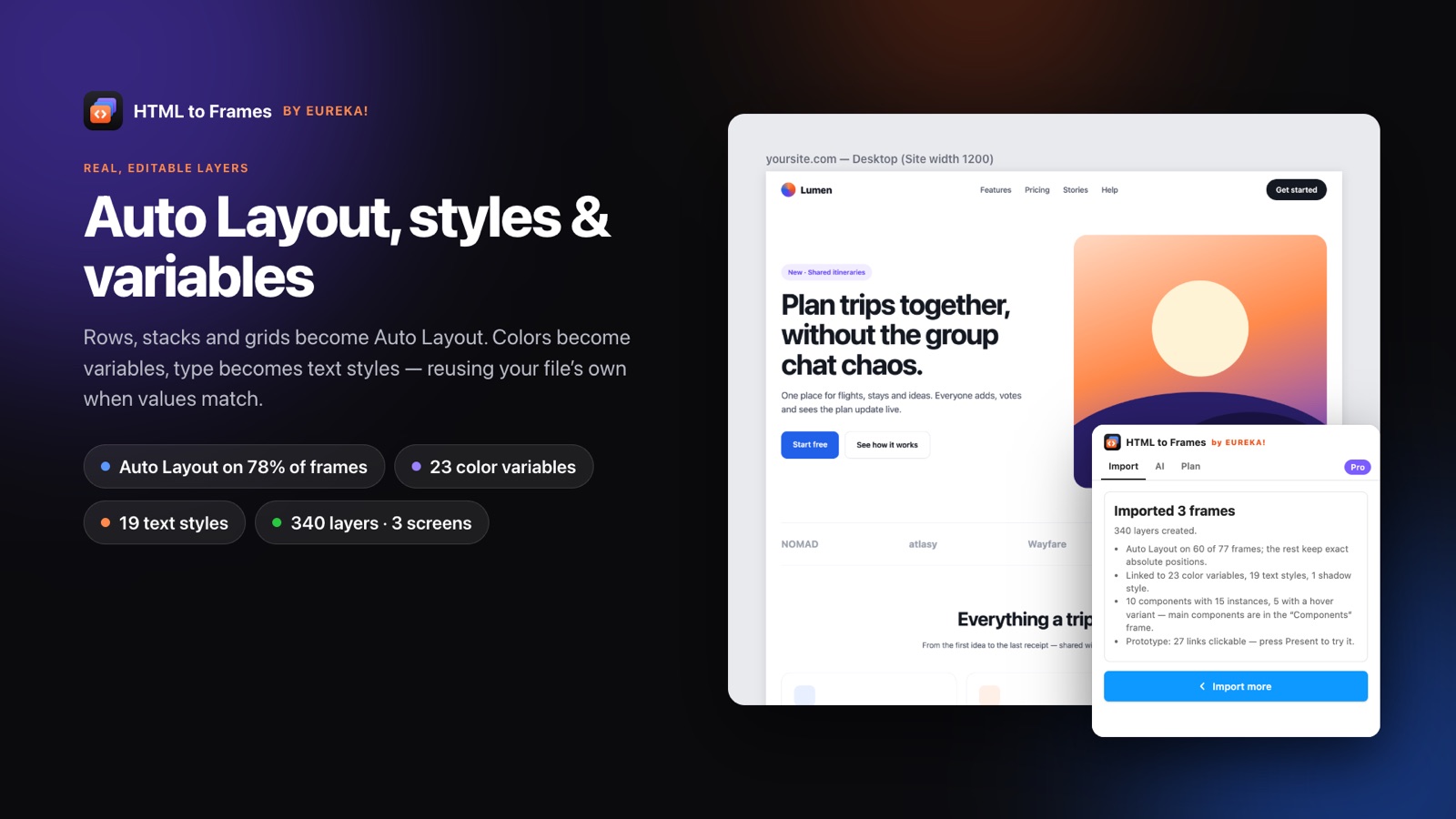
एक से ज़्यादा बार इस्तेमाल हुए colors variables बन जाते हैं — अगर site की अपनी CSS custom properties हों तो उन्हीं के नाम पर, जैसे brand/primary। Typography text styles बन जाती है, बार-बार आने वाली shadows shadow styles बन जाती हैं। Snap to my file's styles के साथ, आपके colors और type से लगभग मिलते-जुलते colors और type आपके अपने variables और styles से map हो जाते हैं, ताकि import ऐसा लगे जैसे वह आपकी file में ही बना हो।
- हर site के लिए 96 color variables और 48 text styles तक
- आपकी file में पहले से मौजूद variables और styles को दोबारा इस्तेमाल करता है
- Light + Dark, दो modes वाले एक collection में capture
- Default / Hover variants और on-hover interactions वाले components
उन लोगों के लिए जो web और Figma के बीच काम करते हैं
Product और UI designers
Redesign की शुरुआत screenshot से नहीं, असली चीज़ से करें। Spacing, type और color का audit सेकंडों में करें।
Design agencies
Client की मौजूदा site को उसी दिन proposal के लिए Figma में लाएं। पांच seats के लिए Team plan।
Design-system teams
कोई product असल में जो भी color और type style इस्तेमाल करता है, सब खोजें — आपके variables से map करके।
Front-end developers
Localhost या staging का काम designers को एडिटेबल Figma frames के रूप में सौंपें।
AI builders
Claude Code, Claude Desktop या Cursor से UI सीधे अपनी Figma file में भेजें।
Students
बेहतरीन websites को layer दर layer खोलकर देखें और सीखें कि वे कैसे बनी हैं।
एडिटेबल layers, screenshots और rebuilds से बेहतर हैं
| Screenshot | हाथ से rebuild | HTML to Frames | |
|---|---|---|---|
| एडिटेबल text | नहीं | हाँ | हाँ |
| Auto Layout | नहीं | हाँ, हाथ से | हाँ, verified |
| Variables और styles | नहीं | हाथ से | Generate या reuse किए गए |
| Tablet और mobile | अलग-अलग captures | घंटों का अतिरिक्त काम | एक import |
| एक पेज में लगने वाला समय | सेकंड | घंटे | कुछ सेकंड से एक मिनट |
Fair pricing, launch discount के साथ
Free में शुरू करें। Launch पर Pro $7 प्रति माह में unlimited है — और शुरुआती ग्राहकों के लिए यही price बनी रहती है।
- हर महीने 10 imports
- हर import में 1 screen
- Multiple import — 10 links तक
- Link, local files, Chrome extension, AI tools
- Verified Auto Layout
- मापी गई site width
- Font mapping
- Prototype links
Pro
Launch priceUnlimited imports और पूरा toolkit, Figma के अंदर ही खरीदें।
- Unlimited imports (fair use: 1,000 / माह)
- हर import में 4 screens तक
- Styles & variables
- Snap to my file's styles
- Components & hover variants
- Light + Dark variable modes
- Custom widths
- Detailed layers, reference screenshot, extra wait
Team
5 seatsPro की हर सुविधा आपकी पूरी team के लिए, एक ही license key के साथ।
- Pro की हर सुविधा
- एक license key पर 5 seats
- Unlimited imports (fair use: 5,000 / माह)
- Seats एक व्यक्ति से दूसरे को ट्रांसफ़र की जा सकती हैं
आपके पेज हमारा data नहीं हैं
पेज एक isolated, sandboxed browser में render होते हैं। नतीजा आपके plugin को एक बार deliver होता है, फिर delete हो जाता है — कभी disk पर नहीं लिखा जाता। Upload की गई files import पूरा होते ही मिटा दी जाती हैं। कोई cookies नहीं, कोई analytics नहीं, कोई ads नहीं।
Blog
सभी लेखCSS to Figma Auto Layout: Flexbox और Grid mapping guide
Flexbox और Figma Auto Layout मिलते-जुलते दिखते हैं, लेकिन वे एक ही model नहीं हैं। यह technical guide CSS properties को Auto Layout settings से map करती है, बताती है कि verification क्यों ज़रूरी है, और दिखाती है कि साफ़ import होने वाली CSS कैसे लिखें।
10 मिनट में पढ़ेंlocalhost to FigmaLocalhost to Figma: Chrome extension से कोई भी पेज capture करें
कुछ पेजों तक URL import नहीं पहुंच सकता: आपका localhost build, login के पीछे का dashboard, अभी खुला हुआ menu। Free HTML to Frames Chrome extension उन्हें आपके अपने browser से capture करता है और एडिटेबल Figma layers में बदल देता है।
9 मिनट में पढ़ेंAI to FigmaAI to Figma: Claude और Cursor का UI MCP से Figma में भेजें
AI coding tools मिनटों में काम करने वाला UI बना सकते हैं, लेकिन designers को वह फिर भी Figma में चाहिए। यहां बताया गया है कि Claude Code, Claude Desktop या Cursor को MCP के ज़रिए HTML to Frames से कैसे connect करें और screenshots के बजाय एडिटेबल layers पाएं।
9 मिनट में पढ़ेंअक्सर पूछे जाने वाले सवाल
यह एक Figma plugin है जो web पेजों को असली, एडिटेबल Figma layers में बदलता है। आप एक live URL, एक साथ 10 links तक, एक local HTML file या site folder, paste किया गया code, Chrome extension से capture किया गया tab, या MCP के ज़रिए AI tool से भेजा गया HTML import कर सकते हैं। पेज text, vectors और images वाले frames के रूप में आते हैं — Auto Layout, variables, styles और components के साथ।
नहीं। हर heading एक text layer है जिसे आप edit कर सकते हैं, हर icon एक vector है और हर section एक frame है। सिर्फ़ वह content जो HTML नहीं है — iframe में map, WebGL scene या बिना poster का video — उस box की image के रूप में रखा जाता है, ताकि बाकी पेज पूरी तरह एडिटेबल रहे।
Plugin Auto Layout लागू करता है और फिर हर child की position को browser के layout से 2 px के भीतर verify करता है। अगर कोई frame टिकता नहीं, तो वह आसान layout आज़माता है या constraints के साथ absolute positions रखता है। असली sites पर हमारे tests में 86–97% frames को Auto Layout मिला; बाकी की वजह के साथ list दी जाती है।
हाँ, free HTML to Frames Chrome extension के साथ। यह आपके अपने browser में tab capture करता है — logged-in dashboards, localhost, private networks, खुले menus और भरे हुए forms सहित — और उसे clipboard से या Send to Figma के ज़रिए plugin को भेजता है।
Site की मापी गई design width पर Desktop, Laptop 1280, Tablet 768 और Mobile 390, साथ ही Pro पर custom widths। Responsive set एक click में Desktop, Tablet और Mobile import करता है। Free में हर import पर एक screen; Pro और Team में चार तक।
Free में हर महीने 10 imports मिलते हैं। Pro launch पर $7 प्रति माह (सामान्य कीमत $9) में unlimited (fair use) है और Figma के अंदर ही खरीदा जाता है। Team launch पर $22 प्रति माह (सामान्य कीमत $29) है, पांच seats और एक shared license key के साथ। एक import यानी सभी screens वाला एक पेज।
वे एक isolated browser में render होते हैं, आपके plugin को एक बार deliver होते हैं और फिर memory से delete हो जाते हैं — कभी disk पर नहीं लिखे जाते। Upload की गई files import पूरा होने पर हटा दी जाती हैं। Plugin आपकी Figma file नहीं पढ़ता और हमें Figma से आपका नाम या email नहीं मिलता।
हाँ। Plugin के AI tab से Claude Code, Claude Desktop, Cursor या कोई और MCP client connect करें। इसके बाद आपका AI tool import_html या import_url call कर सकता है और पेज आपकी खुली Figma file में आ जाता है, आपके अपने plan से import होकर।
Web को दोबारा बनाना बंद करें।
Link paste करें और कुछ ही सेकंड में असली, एडिटेबल, रिस्पॉन्सिव Figma layers पाएं। शुरुआत free — हर महीने 10 imports।
कोई credit card नहीं। Pro, Figma के अंदर ही खरीदा जाता है।
जल्द ही Figma Community पर