Features
पूरा HTML to Figma toolkit
एक URL से लेकर multi-page, रिस्पॉन्सिव, design system को समझने वाली Figma file तक। यहां वह सब है जो HTML to Frames करता है — और कैसे करता है।
कहीं से भी import करें
पांच sources में public sites, आपके computer की files, वे पेज जिन्हें सिर्फ़ आपका browser देख सकता है, और AI का लिखा code — सब शामिल है।
Link
कोई भी public URL paste करें। पेज एक isolated browser में render होता है, lazy content scroll करके दिखाया जाता है, और आप चाहें तो cookie banners और popups छिपा दिए जाते हैं।
Multiple import
हर import में 10 links तक, एक के बाद एक process होते हैं। हर पेज screens की अपनी अलग row बनता है। हर plan में शामिल — Pro ज़रूरी नहीं।
Local files और paste किया गया code
एक HTML file, पूरा site folder या .zip drop करें और चुनें कि कौन-से पेज import करने हैं — या सीधे HTML/CSS paste करें। Files memory से serve होती हैं और import पूरा होने पर delete हो जाती हैं।
Chrome extension
Logged-in dashboards, localhost, private networks और पेज की मौजूदा state capture करें। एक element या पूरा पेज चुनें, फिर उसे paste करें या Send to Figma करें।
MCP के ज़रिए AI tools
Claude Code, Claude Desktop, Cursor या कोई भी MCP client connect करें। वे import_html या import_url call करते हैं और पेज आपके खुले plugin में आ जाता है।
Linked पेज import करें और Re-import
Import के बाद, उसी site के और पेज एक list से चुनें। बाद में किसी भी frame को एक click वाले Re-import से update करें।
Screens जो असली site से मेल खाती हैं
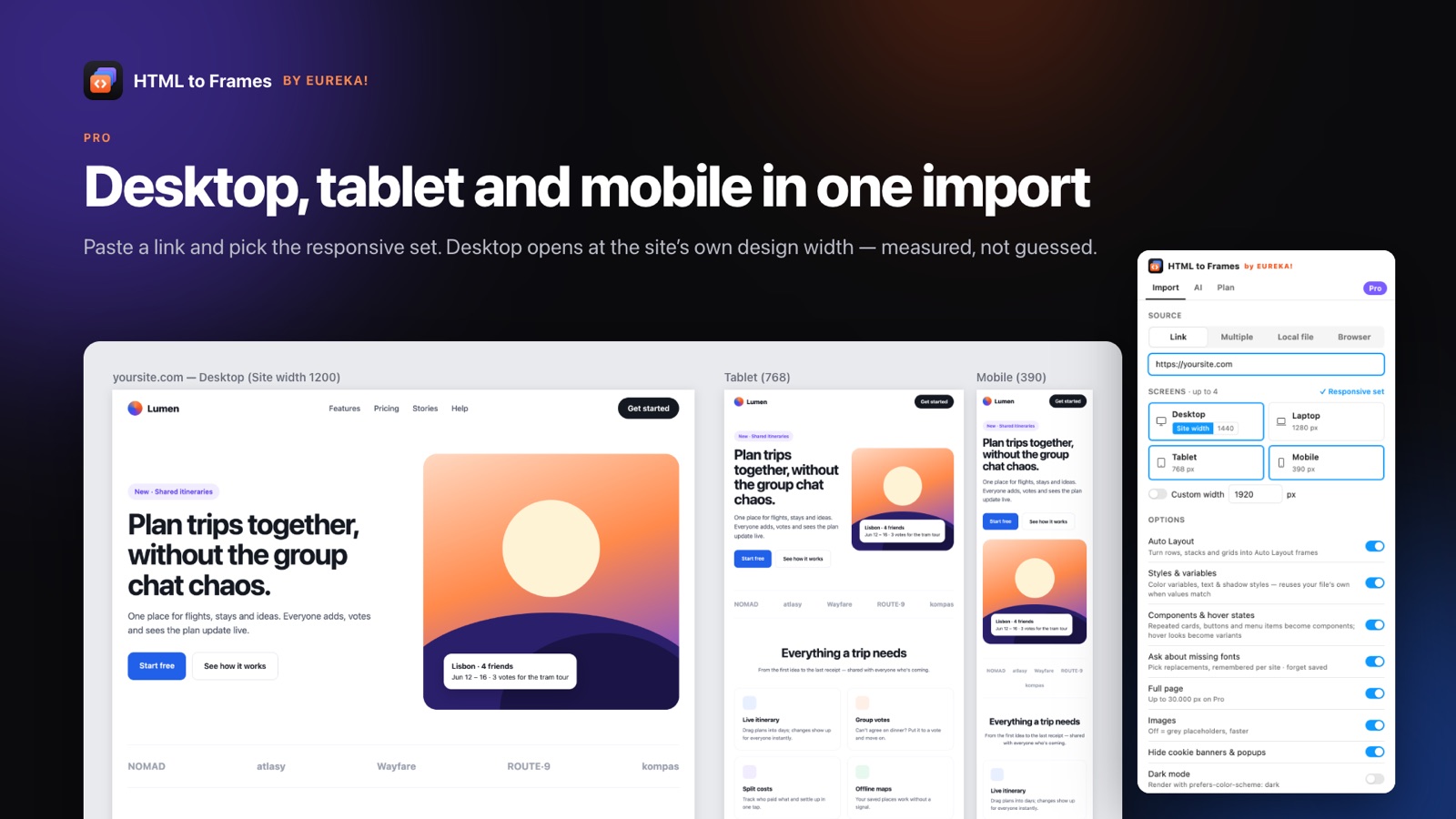
Responsive design का मतलब तीन screenshots से कहीं ज़्यादा है। HTML to Frames हर width को अलग से render करता है, ताकि आपको असली tablet और mobile layouts मिलें।
Site width, मापी हुई
Desktop उसी design width पर खुलता है जिसके लिए site बनाई गई थी: full-bleed layouts के लिए centered box के साथ 1920, boxed sites के लिए box की width, fluid sites के लिए 1440।
Responsive set
एक click में Desktop + Tablet 768 + Mobile 390; Pro पर Laptop 1280 और custom widths। Screens parallel में capture होती हैं।
साफ़ canvas layout
हर पेज की एक row, screens साथ-साथ, frames के नाम जैसे yoursite.com/pricing — Desktop (1920)।
Auto Layout जिस पर आप भरोसा कर सकते हैं
HTML to Frames का मूल। Auto Layout असली browser geometry से निकाला जाता है, लागू किया जाता है और verify किया जाता है — कभी मान नहीं लिया जाता।
Stacks, rows और grids
Vertical और horizontal stacks, wrapping rows, gaps, padding और alignment, हर child की मापी गई position से निकाले जाते हैं।
Responsive अर्थ
Centered content centered रहता है, बराबर cards fill होते हैं, max-width containers बीच में रहते हैं और spacer items stretch होते हैं — ताकि frames site की तरह ही resize हों।
2 px के भीतर verified
Auto Layout लागू करने के बाद, हर child की position की तुलना browser से की जाती है। अगर वह खिसकी, तो एक आसान plan आज़माया जाता है; वरना frame सटीक positions बनाए रखता है।
Smart constraints
जो frames absolute positions रखते हैं, उन्हें Stretch, Scale, Center या Min/Max constraints मिलते हैं, ताकि resize करने पर भी वे सही व्यवहार करें।
Diagnostics
Result screen बताती है कि हर frame absolute क्यों रहा — असमान gaps, overlap, text size में अंतर — ताकि कुछ भी रहस्य न रहे।
Design system, निकाला हुआ
किसी site के colors, type और बार-बार आने वाले UI को Figma design system के building blocks में बदलें — या उन्हें अपने design system से map करें।
Color variables
'Colors · domain' collection में 96 color variables तक, जिनके नाम site की CSS custom properties से रखे जाते हैं (उदाहरण के लिए --brand-primary → brand/primary)।
Text और shadow styles
Role और size के हिसाब से नाम वाली 48 text styles तक, साथ ही sm से xl तक shadow styles। Fills, strokes और text colors variables से bind होते हैं।
Reuse करें, duplicate नहीं
अगर आपकी file में उसी value वाला variable या style पहले से है, तो वही इस्तेमाल होता है। एक ही site को दो बार import करने पर कुछ नया नहीं बनता।
Snap to my file's styles
लगभग मेल खाने वाले colors और text, perceptual color distance के आधार पर आपके अपने design system के सबसे क़रीबी color और text style से snap हो जाते हैं।
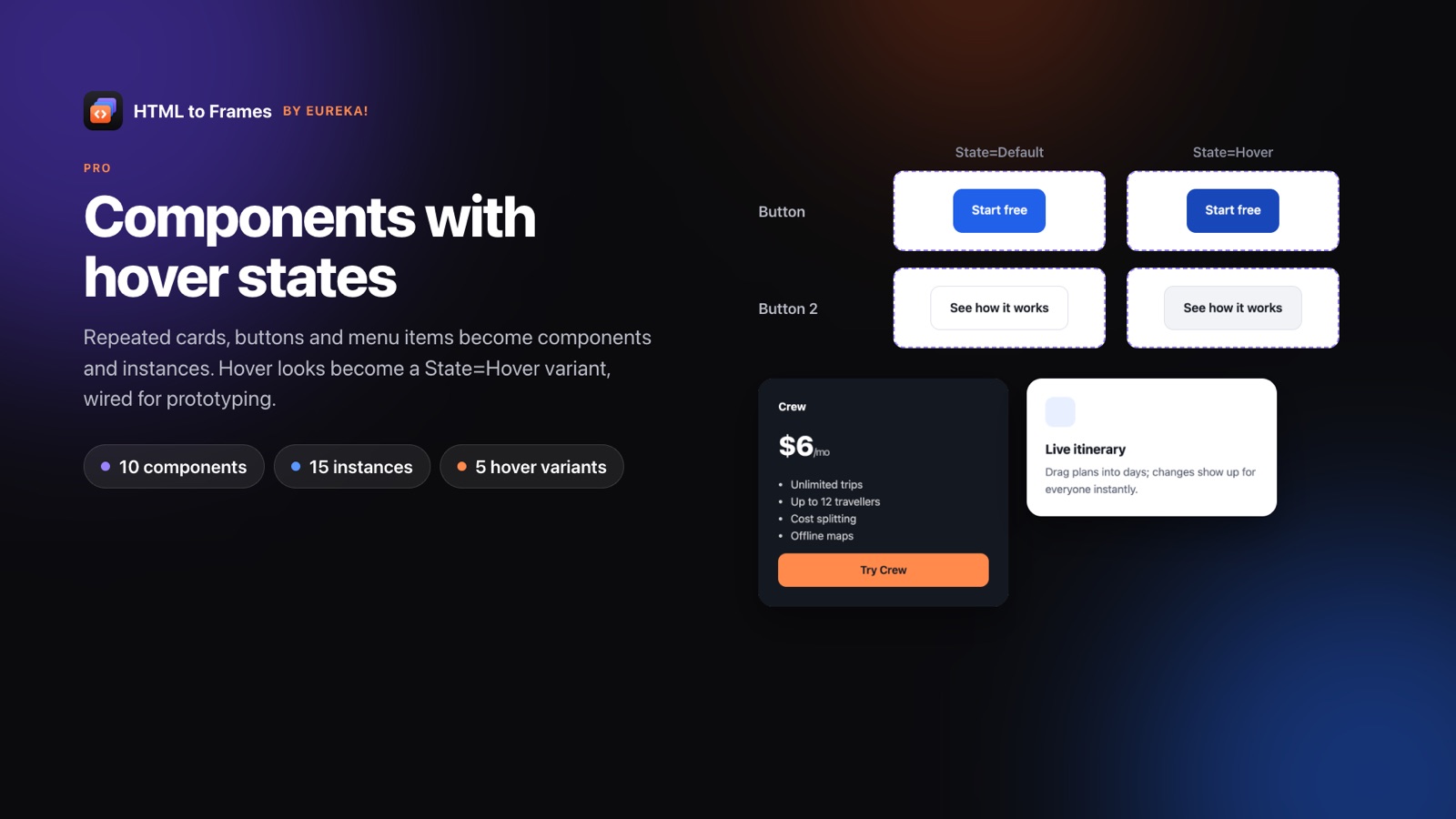
Components और hover variants
बार-बार आने वाले cards, buttons और menu items, components और instances बन जाते हैं। Hover looks, on-hover interaction के साथ Default/Hover variants बन जाते हैं।
Light + Dark
पेज को light और dark color schemes में पढ़ा जाता है और दो modes वाले एक collection में लिखा जाता है, साथ ही हर screen की एक dark copy बनती है।
बारीक से बारीक details तक सटीकता
असली CSS उलझी हुई होती है। HTML to Frames उन details को संभालता है जिनसे पेज बिल्कुल अपने जैसा दिखता है।
Text
एक paragraph में mixed styles, links, letter-spacing, line-height, text-transform, superscript और subscript, CSS counters और Chrome जैसे सटीक list markers।
Paint
Linear, radial और conic gradients (px stops और tiled patterns सहित), blend modes, opacity, blur और backdrop blur, grayscale filters।
Shapes और effects
एडिटेबल vectors के रूप में SVG, border radius, inner और outer shadows, text shadows, एक तरफ़ की borders, ::before/::after, clip-path, mask-image, rotation और scale।
Embedded content
Maps, iframes, WebGL और बिना poster वाले videos उस box की picture के रूप में capture होते हैं, ताकि कुछ भी खाली न रहे।
Images
High-resolution srcset sources, object-fit, background-size और tiled backgrounds।
Fonts
कुछ भी बनने से पहले एक Missing fonts screen replacements सुझाती है और उस site के लिए आपकी पसंद याद रखती है।
Prototype और workflow
Import किए गए पेज click-through के लिए तैयार हैं और उन्हें up to date रखना आसान है।
Clickable links
Present mode में links अपना URL खोलते हैं; import किए गए पेजों के बीच के links, Navigate interactions बन जाते हैं।
Fixed, sticky और scroll
Fixed और sticky headers अपनी जगह रहते हैं, और carousels जैसे horizontal scroll areas prototypes में scroll होते हैं।
Accordion text, notes के रूप में
Optional: बंद accordions में छिपा text, Figma annotations के रूप में जोड़ा जाता है ताकि कोई content न छूटे।
Reference screenshot
Pixel तुलना के लिए हर screen के नीचे एक hidden, locked screenshot layer (Pro)।
अक्सर पूछे जाने वाले सवाल
Free में हर import source, 10 links तक का Multiple import, मापी गई site width, verification के साथ Auto Layout, font mapping, prototype links और embedded content के screenshots शामिल हैं — हर महीने 10 imports और हर import में एक screen के साथ। Styles और variables, components, Light + Dark, custom widths और reference screenshot, Pro features हैं।
हाँ। Plugin layout बनाने के लिए CSS rules सीधे नहीं पढ़ता; वह browser की मापी गई geometry इस्तेमाल करता है। जहां भी नतीजा browser से 2 px के भीतर मेल खाता है, वहां flexbox और grid layouts, Auto Layout stacks और wrapping rows में बदल जाते हैं।
हाँ, Pro पर। Desktop-width screens के लिए capture service links और buttons पर hover state force करती है, उसकी तुलना normal state से करती है और on-hover prototype interaction के साथ Default/Hover variants बनाती है। Mouse enter पर JavaScript से खुलने वाले menus capture नहीं होते।
Skew और 3D transforms, path() वाला clip-path, multi-layer masks और Display-P3 colors अभी convert नहीं होते। Embedded canvases, maps और iframes, layers के बजाय अपने box की images बन जाते हैं।
Web को दोबारा बनाना बंद करें।
Link paste करें और कुछ ही सेकंड में असली, एडिटेबल, रिस्पॉन्सिव Figma layers पाएं। शुरुआत free — हर महीने 10 imports।
कोई credit card नहीं। Pro, Figma के अंदर ही खरीदा जाता है।
जल्द ही Figma Community पर