Multi-page import
Website to Figma: bring the whole site, not just the homepage
Import up to 10 pages in one run, pick more from the site's own links, and present them as a clickable prototype.
- Up to 10 links per Multiple import, on every plan
- Links between imported pages become Navigate interactions
- One measured width for every page of a site
Coming soon to Figma Community
Moving a website to Figma is rarely about one page. A redesign proposal needs the homepage, a category page, a product page, pricing and checkout. An audit needs every template. A content migration needs the long tail of landing pages. HTML to Frames, the Figma plugin by EUREKA!, is built for that scale of work.
The Multiple source takes up to 10 links in one go. Pages are processed one after another and each lands as its own row on the canvas, with all of its screens side by side. Multiple import is available on every plan, including Free, so trying a full-site workflow does not require upgrading first.
After any import you can choose Import linked pages: the plugin lists other pages of the same site that the page links to, and you tick the ones you want. They are imported as a Multiple import, which is a faster way to cover a site than collecting URLs by hand.
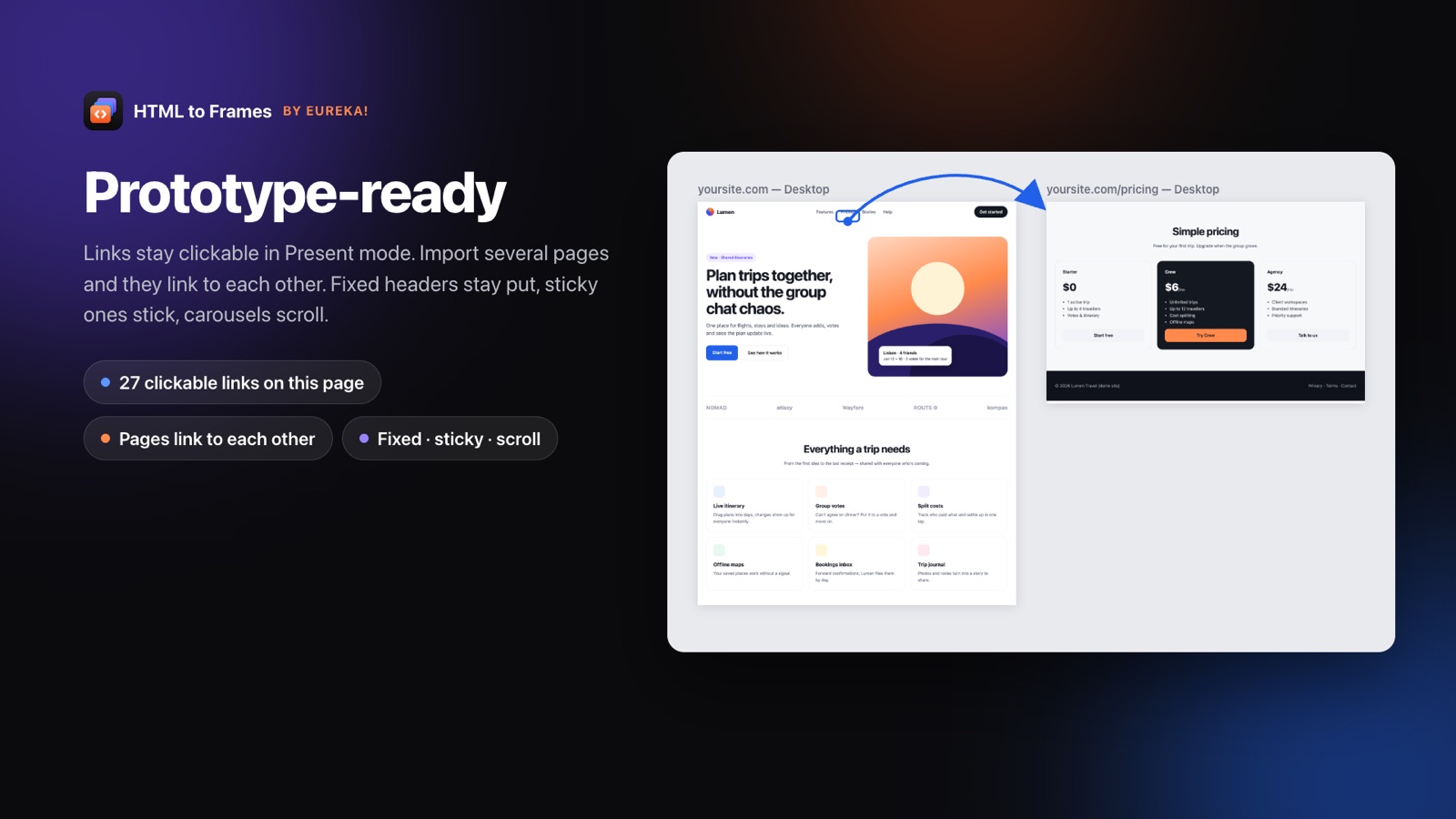
The pages also stay connected. Links between imported pages become Navigate prototype interactions, external links keep an Open link action, and fixed or sticky headers keep working in Present mode. The result is a clickable version of the current site that you can walk a client through before proposing changes.
If you have the site files rather than a live address, drop the whole folder or a .zip and pick which pages to import. For a single page, URL to Figma is the quicker route. Agencies can read the website to Figma redesign guide, and the Team plan with five seats is described on the pricing page.
Importing a website, page by page
- 01
Paste up to 10 links
Use the Multiple tab and add the pages you need; they are processed one after another.
- 02
Pick your screens
Choose Desktop or a full responsive set; every page of the site uses the same measured width.
- 03
Add linked pages
From the results, open Import linked pages and tick more pages of the same site.
- 04
Present it as a prototype
Links between imported pages already navigate, so you can click through the site in Present mode.
Built for multi-page work
Multiple import on every plan
Up to 10 links per run, each page placed as its own row on the canvas.
Import linked pages
Pick other pages of the same site from a list after any import, instead of collecting URLs by hand.
Navigate interactions
Links between imported pages become prototype connections; external links open in the browser.
One width per site
The measured Site width is shared across all pages so frames align row by row.
Site folders and .zip
Drop a folder or archive of up to 30 MB and choose which pages to import.
Shared components
On Pro, repeated cards, buttons and menu items become components you can reuse across pages.
From a single URL to a full site map
There are three ways to get many pages of one website to Figma, and they combine well.
Multiple links
Paste up to 10 URLs into the Multiple tab. The plugin processes them sequentially and places each page in its own row, so a Desktop, Tablet and Mobile capture of one page sits together and pages stack below each other.
Import linked pages
After an import, the plugin can list other pages of the same site that are linked from it. Pick the ones you want and they run as a Multiple import. Starting from the homepage, this usually covers the main navigation in a couple of rounds.
Site folder or .zip
If you have the static build, drag the folder into the Local file tab or upload a .zip of up to 30 MB, then choose which HTML pages to bring in. Files are opened from memory inside an isolated browser and deleted as soon as the import finishes.
Each page counts as one import, whatever the number of screens. On Free you have 10 imports per month; Pro and Team are unlimited within a fair-use allowance. See pricing for details.
A clickable prototype of the current site
A static set of frames is useful, but clients and stakeholders understand a site faster when they can click through it. HTML to Frames keeps the navigation you already have:
- Links between imported pages become Navigate interactions, so clicking Pricing on the homepage frame goes to the pricing frame.
- Other links keep an Open link action and open in the browser.
- Fixed and sticky headers stay in place while you scroll in Present mode.
- Horizontal scroll areas, such as carousels and tab strips, scroll sideways.
On Pro, elements with a hover look become component sets with Default and Hover variants and an on-hover interaction, so buttons and menu items react when you move over them.
This makes the imported site a baseline you can present as is. Walk through the current experience, mark problems with comments, then duplicate the frames and start the redesign next to the original. Because every frame stores its source URL, you can re-import any page later and compare the live site with the proposal. More on how pages are structured in HTML to frame.
Prototype connections are only created between pages that are part of the import, so adding pages with Import linked pages also extends the clickable flow.
How agencies use website to Figma
For a design agency, the first week of a project often goes into recreating the client's existing site so there is something to redesign. Importing it removes most of that work and leaves the team with a file that is already organized.
A typical flow looks like this:
- Before the pitch: import the client's key templates and turn on Styles & variables to see the color and type system actually in use.
- During discovery: present the clickable import to the client and annotate pain points directly on the frames.
- During the redesign: duplicate frames and change them in place; components extracted from repeated structures speed up global changes.
- At handoff: re-import changed pages to confirm what shipped.
The Team plan gives five seats on a shared license key, at a launch price of $22 per month, with up to four screens per import. That suits a small studio where several designers import client sites in parallel.
Agencies handling client work also tend to ask about data. Pages are rendered in an isolated browser, results are delivered once and never written to disk. The full picture is on the security page.
Frequently asked questions
Up to 10 links per Multiple import. They are processed one after another, and each page lands as its own row on the canvas with its screens side by side. Multiple import is available on every plan, including Free, and you can run it again for more pages.
Yes. After an import, Import linked pages lists other pages of the same site that the imported page links to. Tick the ones you want and they are imported as a Multiple import, which is usually faster than collecting URLs manually.
Yes. Links between pages you imported become Navigate interactions, so you can click through the site in Present mode. Other links keep an Open link action. Fixed and sticky headers and horizontal scroll areas also behave as they do on the live site.
Yes. The Desktop Site width is measured from the real design and one site keeps one width across a multi-page import, so frames line up row by row. Tablet 768, Mobile 390 and Laptop 1280 use fixed widths, and Pro adds a Custom width.
One import is one page with all its screens. Ten pages captured on Desktop, Tablet and Mobile count as ten imports, not thirty. Free includes 10 imports per month; Pro and Team are unlimited within a fair-use allowance of 1,000 and 5,000 per month.
The Team plan includes five seats on a shared license key and up to four screens per import, at a launch price of $22 per month, with a regular price of $29. Early customers keep the launch price. Pro is a single-seat plan bought inside Figma.
Related
Stop redrawing the web.
Paste a link and get real, editable, responsive Figma layers in seconds. Free to start — 10 imports every month.
No credit card. Pro is bought inside Figma.
Coming soon to Figma Community